Python

Retrieve all Stock Symbols using python

I need to retrieve all the stocks symbol for a particular market (eg Singapore) to use in conjunction with the stock info retrieval described in the previous post. There are no easy way to get all the stock symbol from yahoo finance or other online resources.

The more easy way is to search the list of stocks under certain alphabet from yahoo finance, scrape the symbol information and repeat it for all the alphabet (and including digits). There are quite a number of scraping and parsing tools (Scrapy, Beautifulsoup, lxml etc). I am using  PATTERN module for the url retrieval and also to parse the various information.

The first step is to generate the url assoicated with the search. Below is the url to search the Singapore stocks (m = SG, t =S) with the alphabet “a” (s=b) and search results from 20 onwards “20” or page 2 of the results (b= 20). Each page will have 20 results.

https://sg.finance.yahoo.com/lookup/stocks?t=S&m=SG&r=&s=b&b=20

To retrieve the information from a particular page or url, the following part of class method are used. Parsing method are from Pattern module:

    def set_dom_object_fr_url(self):
        """ Set the DOM object from url self.sym_full_url.

        """
        url =  URL(self.sym_full_url)
        self.dom_object = DOM(url.download(cached=True))

    def get_sym_for_each_page(self):
        """ Scan all the symbol for one page. The parsing are split into odd and even rows.
        """
        self.set_dom_object_fr_url()

        for n in self.dom_object('tr[class="yui-dt-odd"]'):
            for e in n('a'):
                self.sym_list.append(str(e[0]))

        for n in self.dom_object('tr[class="yui-dt-even"]'):
            for e in n('a'):
               self.sym_list.append(str(e[0]))

To get the number of pages or results to retrieve for each alphabet search, the following text are parsed to get the total search number

    def get_total_page_to_scan(self):
        """ Get the total search results based on each search to determine the number of page to scan.
            Args:
                (int): The total number of page to scan
            Current handle up to 999,999 results
        """
        #Get the number of page
        total_search_str = self.dom_object('div#pagination')[0].content
        total_search_qty = re.search('of ([1-9]*\,*[0-9]*).*',total_search_str).group(1)
        total_search_qty = int(total_search_qty.replace(',','', total_search_qty.count(',')))
        final_search_page_count = total_search_qty/20 #20 seach per page.

        return final_search_page_count

By parsing through all the search alphabet and the pages, all the stocks symbol can be retrieved. Duplicated copy are removed using Pandas (or can use the sets() function).

The full script can be found at GitHub. A sample call and results are shown below.

    ## initialize the class
    sym_extract = AllSymExtr()
    
    ## list the alphabets and number to search. To search all will label a to z
    ## for demo, only search 'a' and 'b'.
    sym_extract.alphanum_str_to_search = 'ab'

    ## perform sweep of each search alphabet and each page
    sym_extract.sweep_of_seach_item()

    ## convert to dataframe and remove duplicates.
    sym_extract.convert_data_to_df_and_rm_duplicates()
    print sym_extract.sym_df

Results are as below:

searching: a
total number of pages to scan: 18
Scanning page number: 1 url: https://sg.finance.yahoo.com/lookup/stocks?t=S&m=SG&r=&s=a&b=20
Scanning page number: 2 url: https://sg.finance.yahoo.com/lookup/stocks?t=S&m=SG&r=&s=a&b=40
............
Scanning page number: 17 url: https://sg.finance.yahoo.com/lookup/stocks?t=S&m=SG&r=&s=a&b=340
Scanning page number: 18 url: https://sg.finance.yahoo.com/lookup/stocks?t=S&m=SG&r=&s=a&b=360

searching: b
total number of pages to scan: 20
Scanning page number: 1 url: https://sg.finance.yahoo.com/lookup/stocks?t=S&m=SG&r=&s=b&b=20
Scanning page number: 2 url: https://sg.finance.yahoo.com/lookup/stocks?t=S&m=SG&r=&s=b&b=40
...........
Scanning page number: 19 url: https://sg.finance.yahoo.com/lookup/stocks?t=S&m=SG&r=&s=b&b=380
Scanning page number: 20 url: https://sg.finance.yahoo.com/lookup/stocks?t=S&m=SG&r=&s=b&b=400

  SYMBOL
0 5FH.SI
1 A7S.SI
2 Q1P.SI
3 A78.SI
4 557.SI
5 P8Z.SI
.. ...
772 E2:L34.SI
780 E1:B32.SI</pre>

 

Extracting stocks info from yahoo finance using python

There are many ways to extract stocks information using python. A simple way to get the current stocks data can be achieved by using python Pandas. The data retrieved however are limited.

The method I use below are based on downloading the various data .csv file, a service provided by the Yahoo Finance. The method to construct the various url to download the .csv information are described in great details from the Yahoo Finance API.

The current script created can only retrieved the most current data statistics for the various stocks. First, it will construct the URL based on user stocks input and the parameters required. It then makes use of the PATTERN module to read the url and download the information to local drive. Next, it will call the pandas function to read the .csv file and convert it to data frame for further analysis.

Sample output of the script is as shown below.


    data_ext = YFinanceDataExtr()

    ## Specify the stocks to be retrieved. Each url constuct max up to 50 stocks.
    data_ext.target_stocks = ['S58.SI','S68.SI'] #special character need to be converted

    ## Get the url str
    data_ext.form_url_str()
    print data_ext.cur_quotes_full_url
    ## >>> http://download.finance.yahoo.com/d/quotes.csv?s=S58.SI,S68.SI&f=nsl1opvkj&e=.csv

    ## Go to url and download the csv.
    ## Stored the data as pandas.Dataframe.
    data_ext.get_cur_quotes()
    print data_ext.cur_quotes_df
    ## >>>   NAME  SYMBOL  LATEST_PRICE  OPEN  CLOSE      VOL  YEAR_HIGH  YEAR_LOW
    ## >>> 0  SATS  S58.SI          2.99  3.00   3.00  1815000       3.53      2.93
    ## >>> 1   SGX  S68.SI          7.18  7.19   7.18  1397000       7.63      6.66

To specify the parameters to be output, it can be changed in the following method of the script. In future, this will be refined to be more user friendly.


    def form_cur_quotes_property_url_str(self):
        """ To form the properties/parameters of the data to be received for current quotes
            To eventually utilize the get_table_fr_xls.
            Current use default parameters.
            name(n0), symbol(s), the latest value(l1), open(o) and the close value of the last trading day(p)
            volumn (v), year high (k), year low(j)
            Further info can be found at : https://code.google.com/p/yahoo-finance-managed/wiki/enumQuoteProperty
        """
        start_str = '&f='
        target_properties = 'nsl1opvkj'
        self.cur_quotes_property_portion_url =  start_str + target_properties

To download data from web, the following pattern method is used:


    def downloading_csv(self, url_address):
        """ Download the csv information from the url_address given.

        """
        url = URL(url_address)
        f = open(self.cur_quotes_csvfile, 'wb') # save as test.gif
        f.write(url.download())
        f.close()

The full script can be found at GitHub.

Scaping google results using python (Updates)

I modified the Google search module described in previous post. The previous limitation of the module to search for more than 100 results is removed.It can now search and process any number of search results defined by the users (also subjected to the number of results returned by Google.)

The second feature include passing the keywords as a list so that it can search more than one search key at a time.

As mentioned in the previous post, I have added a GUI version using wxpython to the script. I will modify the GUI script to take in multiple keywords.

Parsing Dict object from text file (More…)

I have modified the DictParser ,mentioned in previous blog, to handle object parsing. Previous version of DictParser can only handle basic data type, whereas in this version, user can pass a dict of objects for the DictParser to identify and it will replace those variables marked with ‘@’, treating them as objects.

An illustration is as below. Note the “second” key has an object @a included in the value list. This will be subsequently substitute by [1,3,4] after parsing.

## Text file
$first
aa:bbb,cccc,1,2,3
1:1,bbb,cccc,1,2,3

$second
ee:bbb,cccc,1,2,3
2:1,bbb,@a,1,2,3  
## end of file

The output from DictParser are as followed:

p = DictParser(temp_working_file, {'a':[1,3,4]}) #pass in a dict with obj def
p.parse_the_full_dict()
print p.dict_of_dict_obj
>>> {'second': {'ee': ['bbb', 'cccc', 1, 2, 3], 2: [1, 'bbb', [1, 3, 4], 1, 2, 3]},
'first': {'aa': ['bbb', 'cccc', 1, 2, 3], 1: [1, 'bbb', 'cccc', 1, 2, 3]}}

If the object is not available or not pass to DictParser, it will be treated as string.

Using the ‘@’ to denote the object is inspired by the Julia programming language where $xxx is used to substitute objects during printing.

Scaping google results using python (GUI version)

I add a GUI version using wxpython to the script as described in previous post.

The GUI version enable display of individual search results in a GUI format. Each search results can be customized to have the title, link, meta body description, paragraphs on the main page. That is all that is displayed in the current script, I will add in the summarized text in future.

There is also a separate textctrl box for entering any notes based on the results so that user can copy any information to the textctrl box and save it as separate files. The GUI is shown in the picture below.

The GUI script is found in the same Github repository as the google search module. It required one more module which parse the combined results file into separate entity based on the search result number. The module is described in the previous post.

The parsing of the combined results file is very simple by detecting the “###” characters that separate each results and store them individually into a dict. The basic code is as followed.


key_symbol = '###'
combined_result_list,self.page_scroller_result = Extract_specified_txt_fr_files.para_extract(r'c:\data\temp\htmlread_1.txt',key_symbol, overlapping = 0 )

Google Search GUI

Rapid generation of powerpoint report with template scanning

In my work, I need to create PowerPoint (ppt) report of similar template.  For the report, I need to create various plots in Excel or JMP, save it to folders and finally paste them to ppt. It be great if it is possible to generate ppt report  rapidly by using automation. I have created a python interface to powerpoint using com commands hoping it will help to generate the report automatically.

The initial idea is to add command to paste the plots at specific slides and specific positions. The problem with this is that I have to set the position values and picture sizes for each graph in the python script. This become tedious and have to set independently for each report type.

The new idea will be to give the script a scanned template and the script will do the following commands:

  1. Create a template ppt with the graphs at particular slide, position and size set.
  2. Rename each object that you need to copy with the keywords such as ‘xyplot_Qty_year’ which after parsing will require a xyplot with qty as y axis and year as x axis. This will then get the corresponding graph with the same type and qty path and link them together.
  3. See the link on how to rename objects.
  4. The script will scan through all the slide, getting all info of picture that need to be pasted by having the keyword. It will note the x and y positon and the size.
  5. The script will then search the required folder for the saved pic file of the same type and will paste them to a new ppt.

The advantage of this approach is that multiple scanned template can be created. The picture position can be adjusted easily as well.

Sample of the script is as below. It is not a fully executable script.

import os
import re
import sys

import pyPPT

class ppt_scanner(object):
    def __init__(self):

        # ppt setting
        self.ppt_scanned_filename = r'\\SGP-L071166D033\Chengai main folder\Chengai setup files\scanned_template.ppt'

        # scanned plot results
        self.full_scanned_info = dict()
        self.scanned_y_list = list()

        # plots file save location where keyword is the param scanned
        self.bivar_plots_dict = dict()# to be filled in 

        #ppt plot results
        ##store the slide no and the corresponding list of pic
        self.ppt_slide_bivar_pic_name_dict = dict()

    def initialize_ppt(self):
        '''
            Initialize the ppt object.
            Open the template ppt and save it to target filename as ppt and work it from there
            None --> None (create the ppt obj)

        '''
        self.pptobj = UsePPT()                                          # New ppt for pasting the results.
        self.pptobj.show()
        self.pptobj.save(self.ppt_save_filename)
        self.scanned_template_ppt = UsePPT(self.ppt_scanned_filename)   # Template for new ppt to follow
        self.scanned_template_ppt.show()

    def close_all_ppt(self):
        """ Close all existing ppt. 

        """
        self.pptobj.close()
        self.scanned_template_ppt.close()

## Scanned ppt obj function
    def get_plot_info_fr_scan_ppt_slide(self, slide_no):
        """ Method (pptobj) to get info from template scanned ppt.priorty to get the x, y coordinates of pasting.
            Only get the Object name starting with plot.
            Straight away stored info in various plot classification
            Args:
                Slide_no (int): ppt slide num
            Returns:
                (list): properties of all objects in slide no

        """
        all_obj_list =  self.scanned_template_ppt.get_all_shapes_properties(slide_no)
        self.classify_info_to_related_group(slide_no, [n for n in all_obj_list if n[0].startswith("plot_")] )
        return [n for n in all_obj_list if n[0].startswith("plot_")]

    def get_plot_info_fr_all_scan_ppt_slide(self):
        """ Get all info from all slides. Store info to self.full_scanned_info.

        """
        for slide_no in range(1,self.scanned_template_ppt.count_slide()+1,1):
            self.get_plot_info_fr_scan_ppt_slide(slide_no)

    def classify_info_to_related_group(self, slide_no, info_list_fr_one_slide):
        """Group to one consolidated group: main dict is slide num with list of name, pos as key.
            Append to the various plot groups. Get the keyword name and the x,y pos.
            Will also store the columns for the y-axis (self.scanned_y_list).
            Args:
                slide_no (int): slide num to place in ppt.
                info_list_fr_one_slide (list):

        """
        temp_plot_biv_info, temp_plot_tab_info, temp_plot_legend_info = [[],[],[]]
        for n in info_list_fr_one_slide:
            if n[0].startswith('plot_biv_'):
                temp_plot_biv_info.append([n[0].encode().replace('plot_biv_',''),n[1],n[2], n[3], n[4]])
                self.scanned_y_list.append(n[0].encode().replace('plot_biv_',''))

        self.ppt_slide_bivar_pic_name_dict[slide_no] = temp_plot_biv_info

## pptObj -- handling the pasting
    def paste_all_plots_to_all_ppt_slide(self):
        """ Paste the respective plots to ppt.
        """
        ## use the number of page as scanned template
        for slide_no in range(1,self.pptobj.count_slide()+1,1):
            self.paste_plots_to_slide(slide_no)

    def paste_plots_to_slide(self, slide_no):
        """ Paste all required plots to particular slide
            Args:
                slide_no (int): slide num to place in ppt.

        """
        ## for all biv plots
        for n in self.ppt_slide_bivar_pic_name_dict[slide_no]:
            if self.bivar_plots_dict.has_key(n[0]):
                filename = self.bivar_plots_dict[n[0]]
                pic_obj = self.pptobj.insert_pic_fr_file_to_slide(slide_no, filename, n[1], n[2], (n[4],n[3])) 

if (__name__ == "__main__"):

    prep = ppt_scanner()

    prep.initialize_ppt()

    ## scanned all info -- scanned template function
    prep.get_plot_info_fr_all_scan_ppt_slide()
    prep.scanned_template_ppt.close()

    ## paste plots
    prep.paste_all_plots_to_all_ppt_slide()
    prep.pptobj.save()

    print 'Completed'

Parsing Dict object from text file (Updates)

I have been using the DictParser created as mentioned in previous blog in a recent project to create a setting file for various users. In the project, different users need to have different settings such as parameter filepath.

The setting file created will use the computer name to segregate the different users. By creating a text file (with Dict Parser) based on the different computer names, it is easy to get separate setting parameters for different users. Sample of the setting file are as below.

## Text file
$USER1_COM_NAME
#setting_comment_out:r'c:\data\temp\bbb.txt'
setting2:r'c:\data\temp\ccc.txt'

$USER2_COM_NAME
setting:r'c:\data\temp\eee.txt'
2:1,bbb,cccc,1,2,3
## end of file

The output from DictParser are as followed:

## python output as one dict containing two dicts with different user'USER1_COM_NAME' and 'USER2_COM_NAME'
>> {'USER1_COM_NAME': {'setting2': ['c:\\data\\temp\\ccc.txt']}, 'USER2_COM_NAME': {2: [1, 'bbb', 'cccc', 1, 2, 3], 'setting': ['c:\\data\\temp\\eee.txt']}}

User can use the command “os.environ[‘ComputerName’]” to get the corresponding setting filepath.

I realized that the output format is somewhat similar to json format. This parser is more restrictive in uses hence has some advantage over json in less punctuations (‘{‘, ‘\’) etc and able to comment out certain lines.

Parsing dict object from text file

Sometimes we need to store the different settings in a text file. Getting the different configurations will be easier if each particular setting group is a dict with the different key value pairs. The dict objects can be passed to other functions or modules with ease.

I created the following script that is able to parse the strings from a text file as separate dict obj with base type. This allows user to create the dict object easily in a text file. As for now, the values the dict can take basic type such as int, float and string.

Creating the text file format is simple. Starting a dict on a new line with $ <dict name>  followed by the key value pairs in each subsequent line. The format for the pair is <key>:<value1,value2…>

Example of a file format used is as below:

## Text file
$first
aa:bbb,cccc,1,2,3
1:1,bbb,cccc,1,2,3

$second
ee:bbb,cccc,1,2,3
2:1,bbb,cccc,1,2,3
## end of file
## python output as one dict containing two dicts with name 'first' and 'second'
>> {'first': {'aa':['bbb','cccc',1,2,3],1:[1,'bbb','cccc',1,2,3]},
   'second': {'ee':['bbb','cccc',1,2,3],2:[1,'bbb','cccc',1,2,3]}}

The script is relatively simple, making use of the literal_eval method in ast module to convert the string to various base type. It does not have the danger of eval() method. Below is the code for the method for string conversion.


    def convert_str_to_correct_type(self, target_str):
        """ Method to convert the str repr to the correct type
            Idea from http://stackoverflow.com/questions/2859674/converting-python-list-of-strings-to-their-type
            Args:
                target_str (str): str repr of the type

            Returns:
                (str/float/int) : return the correct representation of the type
        """

        try:
            return ast.literal_eval(target_str)
        except ValueError:
            ## not converting as it is string
            pass
        return target_str

The rest of script is the reading of the different line and parsing it with correct info. The method can be summarized as below method call.

    def parse_the_full_dict(self):
        """Method to parse the full file of dict
            Once detect dict name open the all the key value pairs

        """
        self.read_all_data_fr_file()

        self.dict_of_dict_obj = {}
        ## start parsing each line
        ## intialise temp_dict obj
        start_dict_name = ''
        for line in self.filedata:
            if self.is_line_dict_name(line):
                start_dict_name = self.parse_dict_name(line)
                ## intialize the object
                self.dict_of_dict_obj[start_dict_name] = dict()

            elif self.is_line_key(line):

                 temp_key, temp_value = self.parse_key(line)
                 self.dict_of_dict_obj[start_dict_name][temp_key] = temp_value

The next more complicated case is to handle list of list and also user objects. I do not have any ideas on how to do it yet….

Extracting portions of text from text file

I was trying to read the full book of abstracts from a conference earlier and finding it tedious to copy portions of desired paragraphs for my summary report to be fed into my simple auto-summarized module.

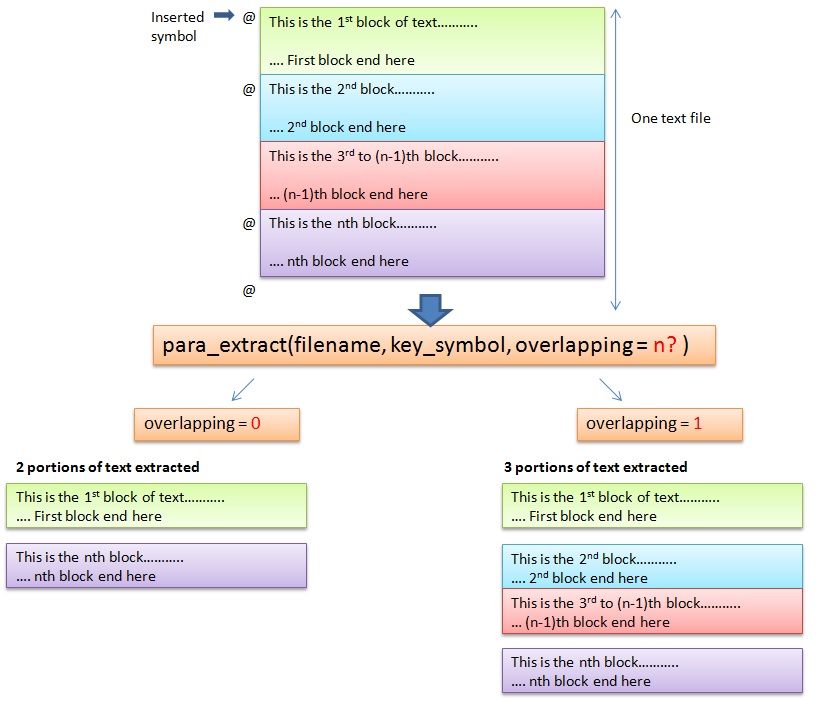
I came up with the following script that allows users to put a specific symbol such as “@” at the start and end of the paragraph to mark those paragraphs or sentences to be extracted. More than one portion can be selected and they can be returned as a list for further processing. For my case, each of the paragraph outputted will be auto summarized.

The following diagram illustrated the two different kinds of extraction.

Illustration of extraction type

The script scans all the lines of the text file, looking for the key_symbol (“@” in this case) and marks the index of the selected lines. The present method only use string “startwith” function. It can be expanded to be using regular expression.

Depending on the mode (overlapping or non-overlapping), it will calculate the portion of the text to be selected and output as a list which can be use for further processing.

Script can be found here.