Build your own study flash cards video (+ background music) using Python easily.
Required Modules
- moviepy
- ImageMagick — for creating text clip
- pandas — optional for managing CSV file
Basic steps
- Read in the text information. Pandas can be used to read in a .csv file for table manipulation.
- create a Textclip object for each text and append all Textclips together
- Add in an audio if desired. Allow the audio to loop through duration of the clip
- Save the file as mp4.
Sample Python Project — Vocabulary flash cards
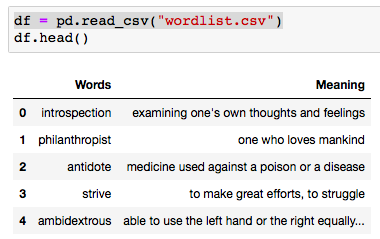
Below is a simple project to create a vocabulary list of common words use in GMAT etc. For each word and meaning pair, it will flash the word followed by its meaning . There is slight pause in the timing to allow some time for the user to recall on the meaning for the particular words
Sample table for wordlist.csv (which essentially is a table of words and their respective meanings) * random sample (subset) obtained from web
def create_txtclip(tgt_txt, duration = 2, fontsize = 18):
    try:
        txt_clip = TextClip(tgt_txt, fontsize = fontsize, color = 'black',bg_color='white', size=(426,240)).set_duration(duration)
        clip_list.append(txt_clip)
    except UnicodeEncodeError:
        txt_clip = TextClip("Issue with text", fontsize = fontsize, color = 'white').set_duration(2)
        clip_list.append(txt_clip)

from moviepy.editor import *

df = pd.read_csv("wordlist.csv")
for word, meaning in zip(df.iloc[:,0], df.iloc[:,1]):
    create_txtclip(word,1, 70)
    create_txtclip(meaning,3)

final_clip = concatenate(clip_list, method = "compose")

# optional music background with loop
music = AudioFileClip("your_audiofile.mp3")
audio = afx.audio_loop( music, duration=final_clip.duration)

final_clip = final_clip.set_audio(audio)

final_clip.write_videofile("flash_cards.mp4", fps = 24, codec = 'mpeg4')<span id="mce_SELREST_start" style="overflow:hidden;line-height:0;"></span>
In some cases, the audio for the flash cards does not work when play with Quicktime, will work on VLC
Sample video (converted to gif)

 Simply Python