coding

Parsing dict object from text file

Sometimes we need to store the different settings in a text file. Getting the different configurations will be easier if each particular setting group is a dict with the different key value pairs. The dict objects can be passed to other functions or modules with ease.

I created the following script that is able to parse the strings from a text file as separate dict obj with base type. This allows user to create the dict object easily in a text file. As for now, the values the dict can take basic type such as int, float and string.

Creating the text file format is simple. Starting a dict on a new line with $ <dict name>  followed by the key value pairs in each subsequent line. The format for the pair is <key>:<value1,value2…>

Example of a file format used is as below:

## Text file
$first
aa:bbb,cccc,1,2,3
1:1,bbb,cccc,1,2,3

$second
ee:bbb,cccc,1,2,3
2:1,bbb,cccc,1,2,3
## end of file
## python output as one dict containing two dicts with name 'first' and 'second'
>> {'first': {'aa':['bbb','cccc',1,2,3],1:[1,'bbb','cccc',1,2,3]},
   'second': {'ee':['bbb','cccc',1,2,3],2:[1,'bbb','cccc',1,2,3]}}

The script is relatively simple, making use of the literal_eval method in ast module to convert the string to various base type. It does not have the danger of eval() method. Below is the code for the method for string conversion.


    def convert_str_to_correct_type(self, target_str):
        """ Method to convert the str repr to the correct type
            Idea from http://stackoverflow.com/questions/2859674/converting-python-list-of-strings-to-their-type
            Args:
                target_str (str): str repr of the type

            Returns:
                (str/float/int) : return the correct representation of the type
        """

        try:
            return ast.literal_eval(target_str)
        except ValueError:
            ## not converting as it is string
            pass
        return target_str

The rest of script is the reading of the different line and parsing it with correct info. The method can be summarized as below method call.

    def parse_the_full_dict(self):
        """Method to parse the full file of dict
            Once detect dict name open the all the key value pairs

        """
        self.read_all_data_fr_file()

        self.dict_of_dict_obj = {}
        ## start parsing each line
        ## intialise temp_dict obj
        start_dict_name = ''
        for line in self.filedata:
            if self.is_line_dict_name(line):
                start_dict_name = self.parse_dict_name(line)
                ## intialize the object
                self.dict_of_dict_obj[start_dict_name] = dict()

            elif self.is_line_key(line):

                 temp_key, temp_value = self.parse_key(line)
                 self.dict_of_dict_obj[start_dict_name][temp_key] = temp_value

The next more complicated case is to handle list of list and also user objects. I do not have any ideas on how to do it yet….
Extracting portions of text from text file

I was trying to read the full book of abstracts from a conference earlier and finding it tedious to copy portions of desired paragraphs for my summary report to be fed into my simple auto-summarized module.

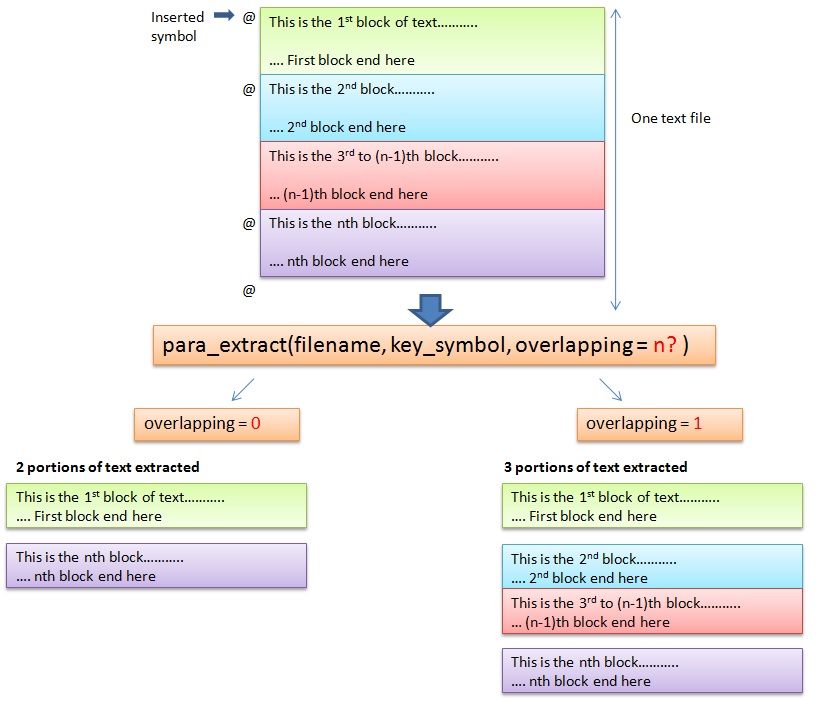
I came up with the following script that allows users to put a specific symbol such as “@” at the start and end of the paragraph to mark those paragraphs or sentences to be extracted. More than one portion can be selected and they can be returned as a list for further processing. For my case, each of the paragraph outputted will be auto summarized.

The following diagram illustrated the two different kinds of extraction.

Illustration of extraction type

The script scans all the lines of the text file, looking for the key_symbol (“@” in this case) and marks the index of the selected lines. The present method only use string “startwith” function. It can be expanded to be using regular expression.

Depending on the mode (overlapping or non-overlapping), it will calculate the portion of the text to be selected and output as a list which can be use for further processing.

Script can be found here.


Scaping google results using python (Part 3)

The  post on the testing of google search script I created last week describe the limitations of the script to scrape the required information. The search phrase is “best hotels to stay in Tokyo”. My objective is to find suitable and popular hotels to stay in Tokyo and within the budget limit.

The other limitation is that the script can only take in one input or key phrase at one go. This is not very useful. Users would tend to search a variation of the key phrases to get the desirable results. I done some modifications to the script so it can take in either a key phrase (str) or  a list of key phrases (list) so it can search all the key phrases at one go.

The script will now iterate the search phrases. Below is the summarized flow:

  1. For each key phrase in key phrase list, generate the associated google search url, append all url to list.
  2. For the list of google search url, Scrapy will scrape the individual url for the google results links. Append all links to a output file. There is one drawback. The links for the first key phrases will be displayed first followed by the 2nd key phrase.
  3. For each of the links, Scrapy will scrape the content namely the title, meta description and for now, if specified,  all the text within the <p> tag.
  4. The resulting file will be very big depending on the size of the search results.

The format of the output is still not to satisfaction. Also printing all the <p> tag does not accomplished much in summarizing what I need.

The next step, hopefully, can utilize some of the NLTK and summarize tools to help filter the results.

The current script is in Git Hub.

Getting Google Search results with python (testing the program)

I was testing out the google search script I created last week. I was searching for the “best hotels to stay in Tokyo”. My objective is to find suitable and popular hotels to stay in Tokyo and within the budget limit.

The python module was created with the intention to display more meaningful and relevant data without clicking to individual websites. However, with just the meta title and meta contents from the search results, it is not really useful in obtaining meaningful results.

I tried to modify the module by extraction of the paragraphs from each site and output them together with the meta descriptions. I make some changes to the script to handle  multiple newline characters and debug on the unicode error that keeps popping out when output the text results.

To extract the paragraphs from each site, I used the xpath command as below.

sel = Selector(response)
paragraph_list = sel.xpath('//p/text()').extract()

To handle the unicode identification error, the following changes are made. The stackoverflow link provides the solution to the problem.

## convert the paragraph list to one continuous string
para_str = self.join_list_of_str(paragraph_list, joined_chars= '..')
## Replace any unknown unicode characters with ?
para_str = para_str.encode(errors='replace')
## Remove newline characters
para_str = self.remove_whitespace_fr_raw(para_str)

With the paragraphs displayed at the output, I was basically reading large chunks of texts and it was certainly messy with the newline removed. I could not really get good information out of it.

For example, it is better to get the ranked hotels from tripadvisor site but from the google search module, tripadvisor only displays the top page without any hotels listed. Below is the output I get from TripAdvisor site pertaining to the search result.

Tokyo Hotels: Check Out 653 hotels with 77,018 Reviews – TripAdvisor
ttp://www.tripadvisor.com.sg/Hotels-g298184-Tokyo_Tokyo_Prefecture_Kanto-Hotels.html

Tokyo Hotels: Find 77,018 traveller reviews and 2,802 candid photos for 653 hotels in Tokyo, Japan on TripAdvisor.

Price per night..Property type..Neighbourhood..Traveller rating..Hotel class..Amenities..Property name..Hotel brand

Performing recursive crawling on TripAdvisor itself perhaps will achieve more meaningful results.

Currently, I do not have much idea on enhancing the script to extract more meaningful data. Perhaps I can use text processing to summarize the paragraphs into meaningful data which would be the next step, utilizing the NLTK module. However, I am not hopeful of the final results.

For this particular search query, perhaps it would be easier to cater specific crawling methods on several target website such as TripAdvisor, Agoda etc rather than a general extraction of text.